ESXi HA Agent Unreachable
My vCenter reported that few of the ESXi HA Agent are unreachable. I've tried to run "Reconfigure for vSphere HA" but still not working.
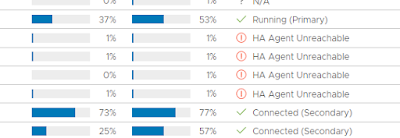

So, step 1, put the host into Maintenance mode first.
Step 2, SSH into the host, run below command to confirm whether we have HA FDM agent already installed.
esxcli software vib list | grep fdm

ok that confirmed we have the agent installed however, the version here is incorrect. My VCSA is version 7, and to confirm VCSA agent version, SSH to VCSA and check in the directory "/etc/vmware-vpx/docRoot/vSphere-HA-depot/vib20/vmware-fdm" to confirm the version

true enough, the FDM version between ESXi and vCenter was mismatched.
That means, we need to remove the FDM agent from the ESXi and try to reinitialize the HA from vCenter.
To remove the agent, you may follow KB: How to run vSphere HA agent remove script in ESXi (83174) (vmware.com)
Then I received error, that other VIB are depending on the vmware-fdm VIB


then finally remove the FDM agent

Then, since we removed VIB, this will need a reboot. Perform reboot and after that, exit maintenance mode. The HA should be initialized successfully, give it some time to complete though. Mine took like 15 minutes to take effect.


Comments
Post a Comment